 PST to PDF Converter Software
Open a PST file without Outlook on Windows. Use a free PST viewer to browse and export .pst to PDF, plus Gmail, Thunderbird, size and corruption fixes.
Can Thunderbird open a PST file directly?
No. Mozilla Thunderbird has no native .pst import. Convert the PST to MBOX, usually with the ImportExportTools NG add-on, then import that MBOX into Thunderbird. The extra conversion can be slow on big mailboxes.
The Thunderbird support site and add-on docs describe the add-on route. Formatting or attachments sometimes shift during conversion. A dedicated convert PST to MBOX tool writes the whole mailbox in Thunderbird's native layout in one pass.
How do I convert a PST file to PDF?
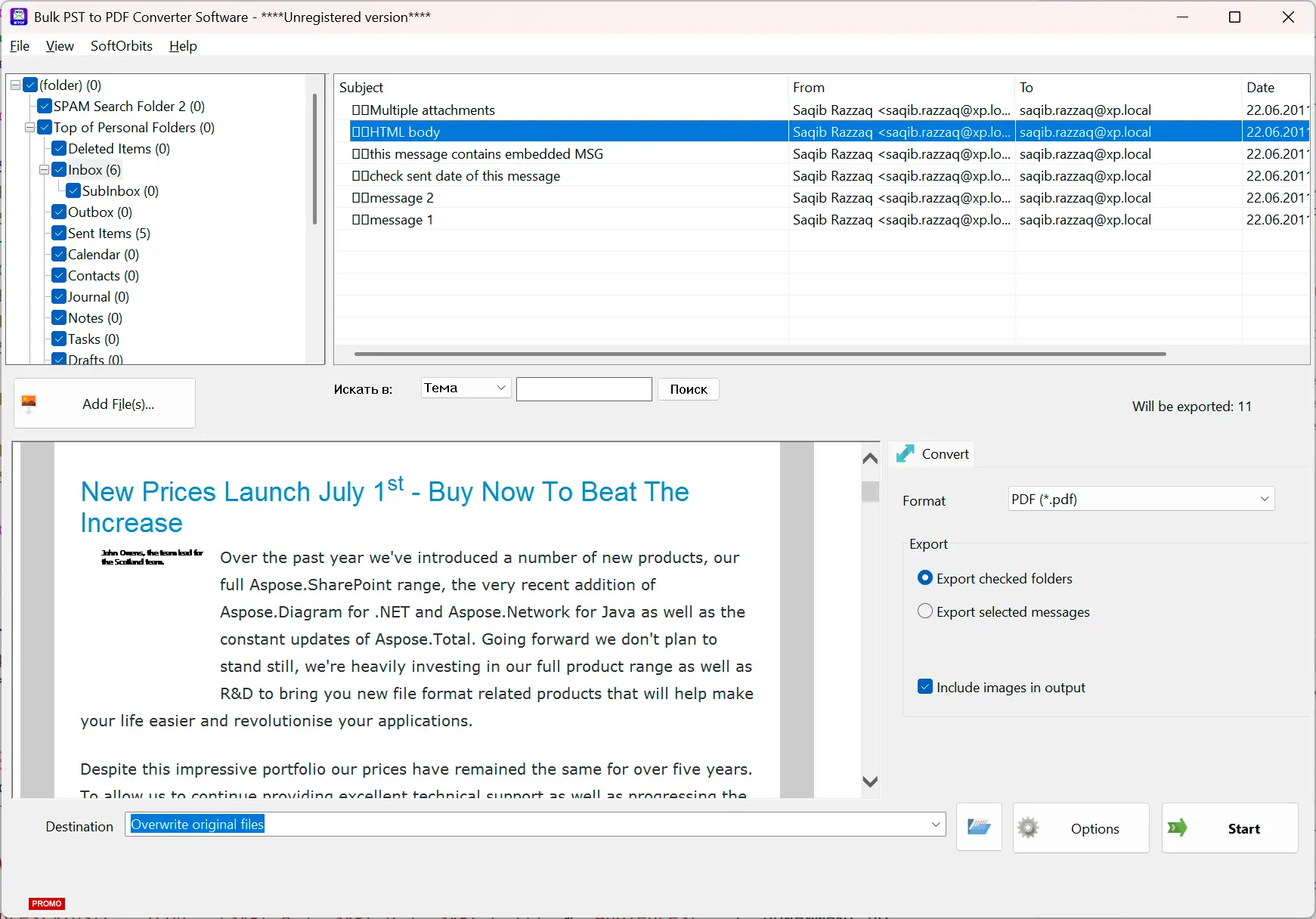
Use a dedicated viewer or converter that reads the .pst and exports selected folders to PDF in one pass. Outlook's own "print each email to PDF" works for a handful of messages, but it does not scale to a whole mailbox. SoftOrbits Bulk PST to PDF Converter is also available from the Microsoft Store.
A batch export lets you choose folders and avoids printing each message separately. When the exported documents need to go on paper, a tool that can print a whole folder of files at once handles the printing. It is also in the Microsoft Store as SoftOrbits Batch Printing Software. A batch html to pdf converter also exports a directory of saved web pages to PDF in one pass. If you will need to search those PDFs, batch convert PDF to TXT and keep the text files beside them.
How do I open a corrupted PST file without Outlook?
A viewer can often still read a mildly damaged PST, but real corruption needs repair first. Microsoft's ScanPST.exe (the Inbox Repair Tool) ships with Outlook; without Outlook you rely on a viewer's tolerance or a third-party repair tool, and severe damage may not be fully recoverable.
If a viewer opens the file but a few folders look wrong, try a compatible reader. If nothing opens it, the file is likely damaged. ScanPST is the standard fix, but it has limits. Sysadmins report a 50GB mailbox that ScanPST could not repair, which is common near the size limit.
What to try before assuming total loss:
How do I handle a very large PST file (25GB to 50GB)?
First check whether the file is ANSI or Unicode. ANSI PSTs are capped at 2 GB and corrupt near it; Unicode PSTs (Outlook 2010 and up) default to a 50 GB limit. A 25GB to 50GB file is Unicode, and a viewer that streams it instead of loading it whole handles it best.
An older ANSI file that reaches 2 GB is at real risk of corruption. Unicode files have higher limits, depending on the Outlook version.
| Format | Outlook version | Default size limit |
|---|---|---|
| ANSI (.pst) | All versions | 2 GB |
| Unicode (.pst) | Outlook 2003 / 2007 | 20 GB |
| Unicode (.pst) | Outlook 2010 / 2013 and later | 50 GB |
Do not try to raise an ANSI file past 2 GB with a registry tweak. Microsoft caps the value on purpose. If MaxFileSize exceeds the ANSI 2 GB limit, the value is ignored to keep the file from corrupting. On a big mailbox, convert or split the PST into smaller files rather than fight the ceiling, or save a lighter copy without the heavy attachments.
Will a free PST viewer let me export, print, or save attachments?
Often not. Many "free" PST viewers open and display the file but gate export, printing, copying text, and saving attachments behind a paid tier. Check whether the free version covers your actual job before you commit, since reading and extracting are often split across tiers.
A viewer may open the file while keeping attachment saving, printing, and folder export in a Pro-only tier. Check the free version before relying on it. If you need the address book, mail merge for Outlook and Excel reads contacts from a .pst or .ost file and sends each of them a personal letter. Contacts saved from the file as .vcf cards become a spreadsheet with a free online vCard to CSV converter. The PST viewer above reads a saved .pst locally; Save As exports the open message to PDF, HTML, EML, or MSG, one message at a time.
Is it safe to use a third-party PST viewer?
Yes, if you pick a reputable offline tool that reads the file locally and does not upload it. Microsoft does not test or support third-party viewers, so the risk is on you; a viewer that processes the mailbox on your PC keeps the data private.
In an official Microsoft Q&A thread, a staff reply says third-party PST viewers are "not provided, tested, or supported by Microsoft." Choose a viewer that opens the file on your machine and does not upload the mailbox. A good viewer reads the PST without writing back to it, so the original stays intact.
Does a PST password actually protect the file?
Not really. The Outlook PST password is a UI-level lock, not encryption. It stops the casual open inside Outlook, but it does not encrypt the mail, which is why legitimate recovery tools can clear a forgotten password from your own file.
The password prompt is an interface lock, not a key that scrambles the data. Dedicated PST password recovery tools can clear a forgotten password from your own file. A plain viewer, including the one here, will not open a genuinely locked file, so recover the password first.
Pitfalls when opening a PST file without Outlook
Most failed attempts come from a handful of avoidable mistakes. People rename the file, run it off a network drive, lean on the new Outlook, or assume a free viewer can export everything. Knowing these upfront saves a wasted afternoon.
Changing .pst to .zip or .txt does not make the file readable. You still need a reader that understands the format. A genuine ZIP archive locked by a forgotten password is a different problem. See how to recover a zip password on the archive itself. An old .rar backup with a forgotten RAR password is the same kind of problem. The same tool is in the Microsoft Store as ZIP Password Recovery Tool by SoftOrbits.
Microsoft does not support PST files on network locations, and this can cause errors that look like corruption. As one r/Outlook thread puts it, pointing to an external drive is "not a supported method by Microsoft." Copy the file to a local disk first.
The redesigned app cannot import a .pst directly or print a mailbox to PDF at scale. People hit this on r/Outlook. Use Classic Outlook or a standalone viewer.
Many free viewers show the mail but paywall export, print, and attachment saving. Confirm the free version covers extraction before relying on it.
Treating a corrupt or oversized PST as "just missing Outlook." If standard methods fail, the file may be damaged. A 50GB file that resists ScanPST on r/sysadmin may need repair.
PST to PDF Converter Software
Sources